
OEM22 / OEM24L 3.5 digit LCD Voltmeter, provide 9V and 5V power supply, with low battery indication and display hold function.
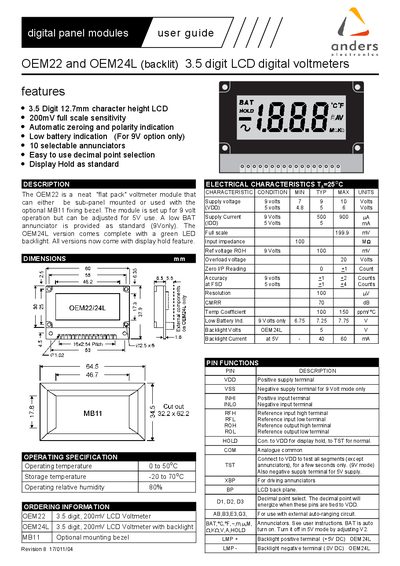
The Anders OEM22 and OEM24L are compact 3.5‑digit LCD voltmeter modules that can be sub‑panel mounted or used with the optional MB11 fixing bezel. The OEM22 operates from a 9 V supply (adjustable to 5 V) and includes automatic zeroing, polarity indication, low‑battery warning and display‑hold. The OEM24L adds a green LED backlight.
The guide provides operating specifications, electrical characteristics, pin functions, connection diagrams and example application circuits for DC voltage, current and ratio measurements. It also explains calibration for 5 V operation, handling of non‑floating inputs, and how to adjust the low‑battery annunciator.
| Display | 3.5 digit, 200 mV full‑scale LCD |
|---|---|
| Operating temperature | 0 °C to 50 °C |
| Supply voltage (9 V mode) | 7 V – 10 V (typical 9 V) |
| Supply current (9 V) | 500 – 900 pA |
| Input impedance | 100 MΩ |
| Accuracy (9 V) | ±2 counts |
| Resolution | 100 µV |
| CMRR | 70 dB |
| Temperature coefficient | 100 – 150 ppm/°C |
| Backlight voltage (OEM24L) | 5 V |
| Backlight current (OEM24L) | 40 – 60 mA |
| Input range | 0 – 200 mV |
The modules measure voltages from 0 to 200 mV; over‑range is indicated by blanking the three least significant digits and showing a “1” in the most significant digit.
Connect the module as shown in Figure 2, apply 100 mV to the inputs from a calibrated source, and adjust VR1 until the display reads 1000.
The low‑BAT voltage can be set by adjusting VR2, but it is not recommended to operate with a supply voltage below 7 V.
For 5 V operation, INLO must be connected to TST for non‑floating inputs, or to the analogue common pin COM for floating inputs.