
This instruction sheet describes how to adjust the range of the DPM8100-2 and DPM8400-2 series products
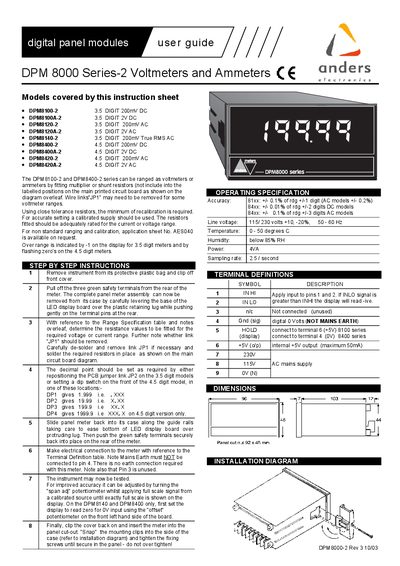
This handbook covers the DPM8000 Series‑2 digital panel modules, listing the specific models (e.g., DPM8100‑2, DPM8420A‑2) and describing how to configure each unit as a voltmeter or ammeter by fitting the appropriate multiplier or shunt resistors and adjusting jumper links. Step‑by‑step instructions guide the user through removal, resistor installation, decimal‑point setting, and final mounting.
Operating specifications such as accuracy, line voltage, temperature range, humidity, sampling rate and dimension details are provided, together with terminal definitions, wiring diagrams and resistor‑selection tables for extending the input range up to 650 V. Safety notes warn against connecting mains earth to pin 4 and outline fuse protection.
| Accuracy (3.5‑digit models) | +0.1% of reading ±1 digit (AC models +0.2%) |
|---|---|
| Accuracy (4.5‑digit DC models) | +0.01% of reading ±2 digits |
| Accuracy (4.5‑digit AC models) | +0.1% of reading ±3 digits |
| Line voltage | 115/230 V ±10%/‑20%, 50‑60 Hz |
| Operating temperature | 0‑50 °C |
| Maximum humidity | < 85 % RH |
| Sampling rate | 2.5 samples per second |
| Panel cut‑out size | 92 mm × 45 mm |
| Maximum input voltage (with correct resistors) | 650 V |
| Input protection fuse | 250 V / 100 mA cartridge |
| +5 V output current capability | max 50 mA |
On 3.5‑digit models the PCB jumper JP2 is repositioned; on 4.5‑digit models a front‑panel dip switch is used.
For 3.5‑digit meters the display shows “‑1”; for 4.5‑digit meters the zeros flash.
Pin 4 must never be connected to mains earth; it is a digital ground only.