
The document describes a bright, red LED display that operates on a single 5V DC power supply. Features include a digit height of 10.16mm, selectable decimal point, self-mountable design, and support for single-ended or differential input.
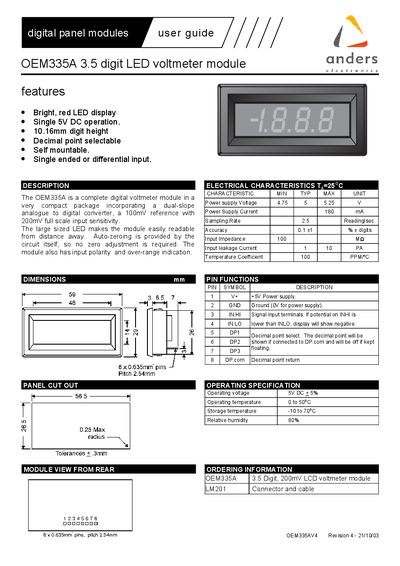
The OEM335A is a compact 3.5‑digit LED voltmeter module with a bright red display, 10.16 mm digit height and selectable decimal point. It operates from a single 5 V DC supply and offers a 0‑199.9 mV input range with 0.141 % accuracy. The module includes self‑zeroing, input polarity and over‑range indication, and can be mounted directly onto a PCB.
The manual describes the pin functions, connection diagrams, and example application circuits for DC voltage, current, and AC voltage measurements. It also covers multi‑range configurations using rotary switches and provides guidelines for using floating inputs, attenuators, and shunt resistors.
| Display type | Bright, red LED |
|---|---|
| Digit height | 10.16 mm |
| Power supply | 5 V DC |
| Power supply current | 180 mA |
| Input range | 0 – 199.9 mV |
| Accuracy | 0.141 % + digits |
| Input impedance | 100 MΩ |
| Input leakage current | 1‑10 pA |
| Temperature coefficient | 100 ppm/°C |
| Operating temperature | 0 – 50 °C |
| Storage temperature | -10 – 70 °C |
| Relative humidity | 80 % |
| Pin pitch | 2.54 mm |
| Number of pins | 8 |
The module is designed for a single 5 V DC supply; using an incorrect supply can damage it.
An over‑range is shown by illuminating a “1” in the most significant digit while blanking the other digits.
Connect the appropriate decimal‑point pin to DPcom to turn the decimal point on.