
The QM4H is a DIN 48 size digital timer that can be set and changed with the front digit switches easily during the power off. Furthermore single unit has a time range of 0.01s to 9990hrs!!
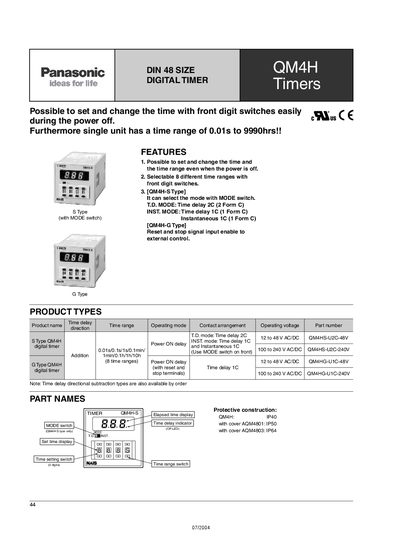
The QM4H series digital timer from Panasonic offers flexible timing functions that can be set and changed even when power is off, using front digit switches. It supports eight selectable time ranges and various operation modes such as time‑delay and instantaneous contacts.
Technical specifications include a wide operating voltage range (12‑48 V AC/DC or 100‑240 V AC/DC), a control capacity of 5 A at 250 V AC, and robust environmental ratings. The unit features a red LED display, silver‑alloy contacts, and dimensions suitable for DIN‑48 panel mounting.
| Time range | 0.01 s to 9990 h |
|---|---|
| Operating voltage | 12‑48 V AC/DC and 100‑240 V AC/DC |
| Rated control capacity | 5 A, 250 V AC (resistive load) |
| Mass (Weight) | Approx. 130 g |
| Ambient temperature range | -10 °C to 55 °C |
| LED display | Red |
| Contact material | Silver alloy |
| Rated frequency | 50/60 Hz |
Yes, the timer allows setting and changing the time with front digit switches even when power is off.
Eight different time ranges can be selected using the front digit switches.
The timer operates from 12 V to 48 V AC/DC and from 100 V to 240 V AC/DC.