
This document introduces 3M's Vikuiti privacy filters, including frameless and fixed privacy filters, as well as different sizes of filters for laptops and desktops.
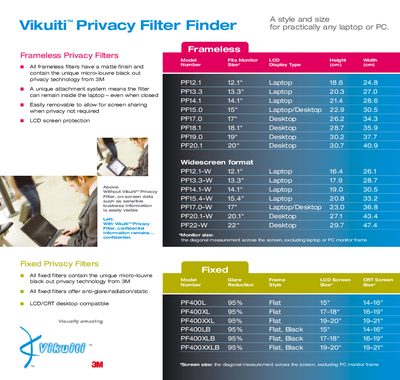
The Vikuiti™ Privacy Filter Finder offers a range of frameless and fixed privacy filters that block on‑screen data from side‑viewers while maintaining clear viewing for the user. Filters are available for many laptop and desktop screen sizes and include anti‑glare and static‑reduction features.
This manual lists the available filter models, their compatible screen sizes, and explains how to attach frameless filters with discrete tabs or install fixed filters. It also provides contact information for further assistance.
| Frameless filter model PF13.3 size | 13.3" Laptop |
|---|---|
| Fixed filter model PF400L size | 14-16" Desktop |
| Anti‑glare feature on fixed filters | Yes |
| Attachment method for frameless filters | Discrete tabs |
Frameless filters attach to the LCD screen with discrete tabs and can be slid up to resume normal viewing when needed.
Frameless filters are offered in sizes such as 13.3" Laptop (PF13.3), 15" Laptop/Desktop (PF15.0), 17" Desktop (PF17.0), 20.1" Desktop (PF20.1), and others.
Visit the 3M privacy filter website or call the filter hotline listed in the manual.