
This document introduces the appearance and buttons of a mobile phone, the functions of its components, the methods of installing SIM cards, PIM cards, and batteries, the steps to switch to standby mode, the procedures for making calls and dialing, and the steps to create contacts and make calls from the phone book.
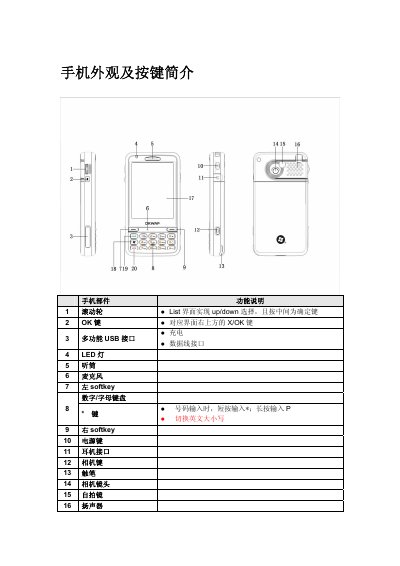
The manual provides an overview of the phone's physical layout, including keys, ports, and indicators. It explains how to insert SIM, PIM cards and the battery, and how to remove them safely.
It also details how to switch between five standby modes, make and receive calls, use quick‑dial and international dialing, and create or manage contacts through the phone's address book. This manual is written in Chinese.
| Number of standby modes | 5 |
|---|---|
| Supported network modes | GSM and PHS (dual‑mode) |
Insert the SIM card into the lower slot with the gold contacts facing down, following the arrow direction shown.
Enter the phone number on the keypad, then press the call (摘机) key to dial.
Tap the signal strength area, then select the desired mode from the standby mode selection screen.