
Sciphone G2 is a phone with WiFi capability. The document discusses the environmental impacts of paper consumption and the need to use less paper, highlighting the features of Sciphone G2.
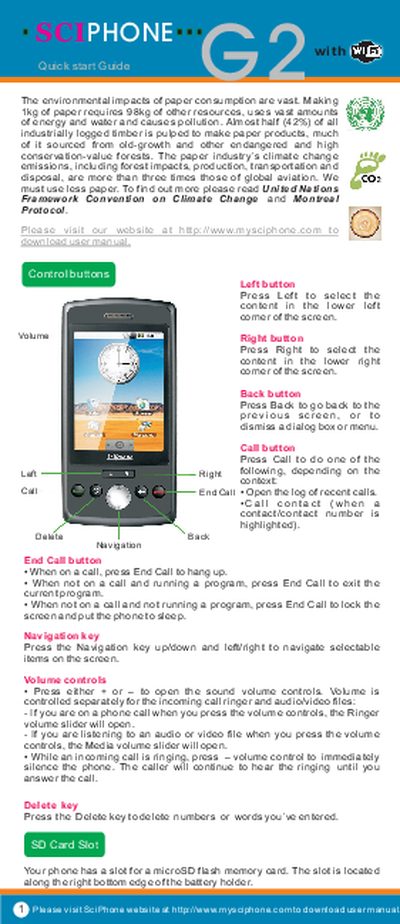
This guide introduces the basic operation of the SciPhone G2 phone. It explains the purpose of each hardware button – Left, Right, Back, Call, End Call, Navigation and Volume – and how to use them for selecting items, adjusting ringer or media volume, and ending calls.
The guide also details how to insert or remove the microSD and SIM cards, how to charge the device with the AC adapter via the USB port, and how to navigate the home screen, scroll lists, and drag items. These steps help users get the phone up and running quickly.
| SD Card Slot | microSD flash memory card slot |
|---|---|
| SIM Card Slot | copper contacts face-down |
| Charging Interface | AC adapter via USB port |
Press and hold the End Call button.
Press the volume controls; the ringer volume slider will open while on a call.
Press the Delete key to delete numbers or words you have entered.