
This document describes how to replace the ink cartridge for your HP printer
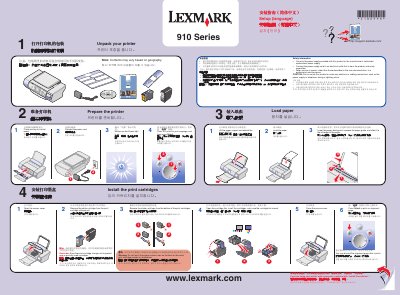
This guide walks you through unpacking the Lexmark 910 Series printer, loading paper, installing print cartridges, and connecting the power cord. It also explains how to select the language, run the alignment page, and install the software on Windows or Mac computers.
Safety information is provided, including warnings about using only the supplied power supply and avoiding installation during lightning storms. The document also offers tips for preventing installation errors, such as closing programs and disabling antivirus software temporarily. This manual is written in Chinese.
Lift the paper support and extend the paper exit tray, then lower the paper feed guard, squeeze the paper guide, and slide the paper to the left edge.
Open the cartridge lids, insert the cartridges, and snap the cartridge lids closed.
Use only the power supply provided with the product and do not make any electrical connections during a lightning storm.