
NOVA OSD V1.0 manual, introduces how to connect power, infrared sensor, current sensor, GPS module, and how to use the remote controller to control the aircraft
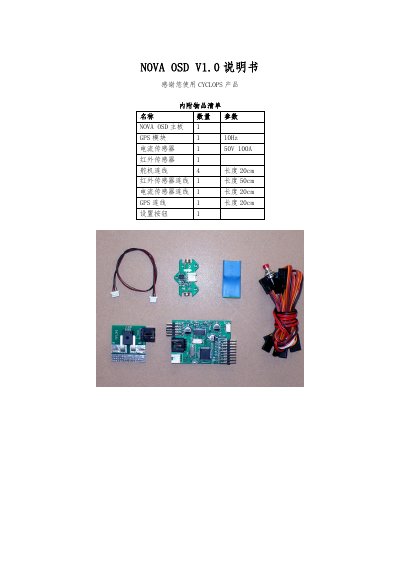
This manual lists the included items such as the NOVA OSD board, GPS module, current sensor, infrared sensor and wiring lengths, and explains the power jumper settings for using a 12 V battery or an external 12 V supply. Detailed wiring diagrams show connections for the current sensor, infrared sensor, GPS and servo cables.
Operating instructions cover power‑on behavior, menu navigation, infrared sensor calibration, servo direction and ELEVON configuration, GPS signal handling, unit switching, flight‑mode selection, reset procedures, and display options. Additional features include automatic video mode detection (PAL/NTSC) and RSSI voltage display with a measurement range of 0.1‑3.3 V. This manual is written in Chinese.
| Power supply (battery) | 12 V or 3S LiPo battery |
|---|---|
| External power option | Separate 12 V supply for OSD and video |
| Current sensor range | 50 V / 100 A |
| Video input modes | PAL and NTSC |
| RSSI voltage measurement range | 0.1 V – 3.3 V |
Press and hold the setting button for about 2 seconds, point one wing upward and the other downward, then wait for the display to flash and show “OK”. If the temperature difference is insufficient, an “ERROR” will appear.
Hold the setting button for 2 seconds until “CENTER” appears, keep the transmitter sticks neutral, then move the elevator stick to maximum and the aileron stick to the rightmost position; the screen will show “OK” when the setting is successful.
Long‑press the setting button for about 3 seconds; the unit system toggles and the chosen setting is saved for the next power‑on.