
This is the user manual for SR-CW10, CW15, CW18 rice cookers. It includes information such as power supply, power consumption, cooking method, menu selection, keep warm temperature, cooking capacity, heat source, temperature detection, timer, buzzer, safety device, power cord, size, weight, and accessories.
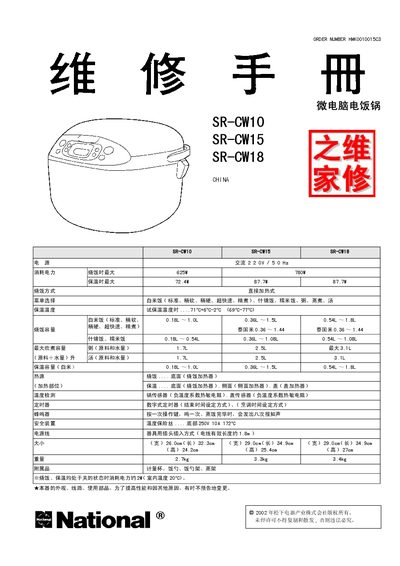
This service manual provides detailed information for repairing National SR‑CW10, SR‑CW15 and SR‑CW18 electric rice cookers. It includes circuit diagrams, wiring schematics, fault‑diagnosis tables, self‑diagnostic LCD symbols, and step‑by‑step procedures for replacing components such as the temperature fuse, heating elements, and control board.
Safety precautions for handling the micro‑computer board, static‑sensitive components, and high‑voltage sections are highlighted, along with test methods for verifying proper operation after repairs. This manual is written in Chinese.
| Input Voltage | 220 V AC 50/60 Hz |
|---|---|
| Maximum Cooking Power | 625 W |
| Maximum Keep‑Warm Power | 72.4 W |
| Weight – SR‑CW10 | 2.7 kg |
| Cooking Capacity | 0.18 L – 1.0 L (white rice) |
Press the Cancel key; the cooker will restore the keep‑warm function.
Ground yourself, avoid static discharge, use a properly grounded soldering iron, disconnect power before touching any components, and keep the board away from conductive surfaces.
Follow the procedure described in the manual’s “温度保险丝的调换方法” section to replace the fuse with a manufacturer‑specified part.
The LCD displays specific symbols that correspond to diagnostic codes; the manual lists each symbol with its meaning and the required repair action.