
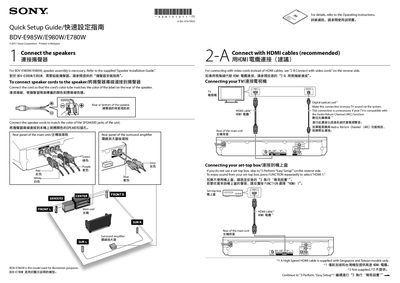
The guide provides step‑by‑step instructions for connecting the speaker system, HDMI cables (recommended), and optional video cords. It also covers connecting a TV, set‑top box, and powering the main unit and surround amplifier.
After the hardware connections, the user performs the on‑screen "Easy Setup" to configure basic settings, insert remote batteries, and insert wireless transceivers. When the on‑screen message "Easy Setup is now complete" appears, the system is ready for use.
| Recommended connection | HDMI cables |
|---|---|
| Alternative video connection | Video cords |
| Audio return option | Digital optical cord |
Connect the speaker cords so the cord’s color matches the color of the label on the rear of the speaker.
Skip to “3 Perform ‘Easy Setup’” and continue with the on‑screen instructions.
Press the FUNCTION button repeatedly to select “HDMI 1”, then follow the on‑screen instructions.
The on‑screen message “Easy Setup is now complete.” appears.