
The debugging steps of the controller in Siemens electric temperature control valve, including the display of Y1 X1 10 * xx.x ℃ after power on, temperature setting, and related internal parameter setting.
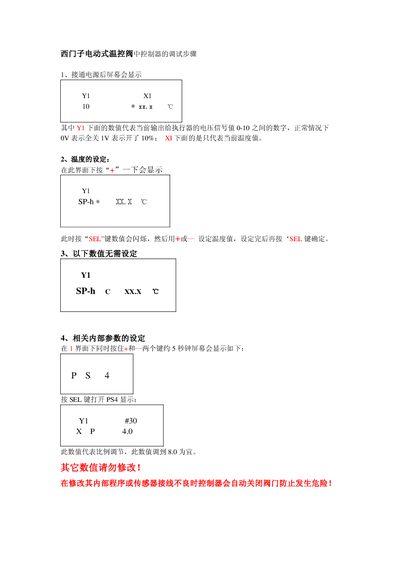
The manual explains the on‑screen indicators, showing the current output voltage to the actuator (0 V = fully closed, 1 V = fully open) and the measured temperature value. It also details how to adjust the set temperature and how the controller displays internal parameters.
To set the temperature, press the “+” key, then use the “SEL” key to adjust the value and confirm with “SEL”. Internal parameters can be accessed by holding “+” and another key for about five seconds; the proportional adjustment should be set to 8.0, while other values must not be changed. If a fault occurs, the controller automatically closes the valve to prevent danger. This manual is written in Chinese.
| Output voltage signal range | 0 V (fully closed) to 1 V (fully open) |
|---|---|
| Proportional adjustment default | 8.0 |
It shows the current output voltage to the actuator; 0 V means the valve is fully closed and 1 V means it is fully open.
Press the “+” key, then press the “SEL” key to make the value flash, adjust with “+” or “–”, and press “SEL” again to confirm.
All internal values except the proportional adjustment (set to 8.0) should be left unchanged.
The controller automatically closes the valve to prevent danger.