
Instructions on how to use AVID editing software, including the features and operations of B302, B303, B305, and B306.
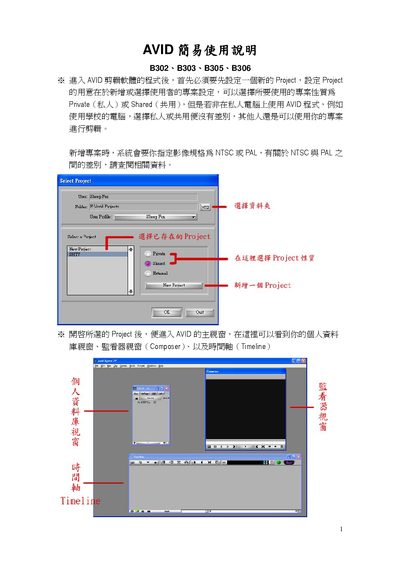
This manual explains how to start a new project in Avid, choose between NTSC or PAL video standards, and set up project properties such as private or shared mode. It also describes how to create and name Bins for organizing media, configure deck settings, and select audio sample rates (e.g., 48 kHz).\n\nThe guide covers timeline editing tools, effect application, 1K Tone generation, and recording options (single‑clip, batch, or linear). It finishes with export procedures, including DV output, adding a black slate, and recommended export settings such as a 10‑second color bar and 1K tone at the start of the video. This manual is written in Chinese.
| Video Standard | NTSC or PAL |
|---|---|
| 1K Tone Length | Configurable (seconds) |
| Export Color Bar | 10 seconds |
Select "New Project" from the menu, choose a project name, set it as Private or Shared, and specify the video standard (NTSC or PAL).
A Bin stores all imported media and completed video clips, helping you organize and retrieve assets during editing.
Check that the video is fully edited, select the desired sequence, enable "Entire Sequence" if needed, and press the red record button to start DV export.