
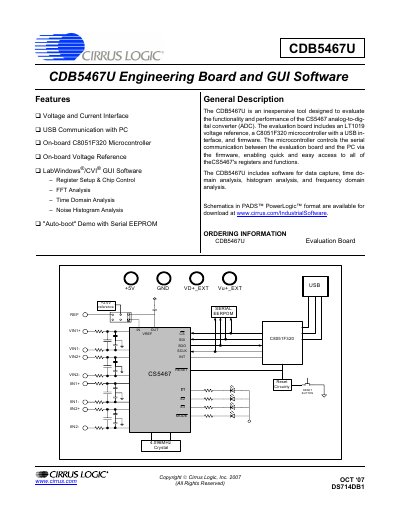
The CDB5467U is an inexpensive evaluation board designed to demonstrate the functionality and performance of the CS5467 power measurement ADC. It includes an on-board LT1019 voltage reference, a C8051F320 microcontroller with USB interface, and screw-terminal connectors for voltage and current inputs. The board operates from a single +5 V supply and provides jumper-selectable reference and input configurations.
The accompanying LabWindows/CVI GUI software enables register setup, chip control, data capture, time-domain analysis, FFT analysis, and noise histogram analysis. The software communicates with the board via USB, and the board also supports an auto-boot demo mode using a serial EEPROM. Schematics, bill of materials, and layer plots are included in the appendices.
| Power Supply | +5 V single supply |
|---|---|
| Voltage Reference Options | On-chip (25 ppm/°C), on-board LT1019 +2.5 V (5 ppm/°C), external via J14 |
| ADC Evaluated | CS5467 power measurement IC |
| Input Connectors | Screw terminals for VIN1±, VIN2±, IIN1±, IIN2± |
| Communication | USB to PC |
The board operates from a single +5 V power supply connected to the +5V binding post.
Three options: the CS5467's on-chip reference, the on-board LT1019 +2.5 V reference, or an external reference applied to J14.