
This document is an introduction to the CDB5460AU evaluation board, including the function and features of the evaluation board, hardware connection, software functions, etc.
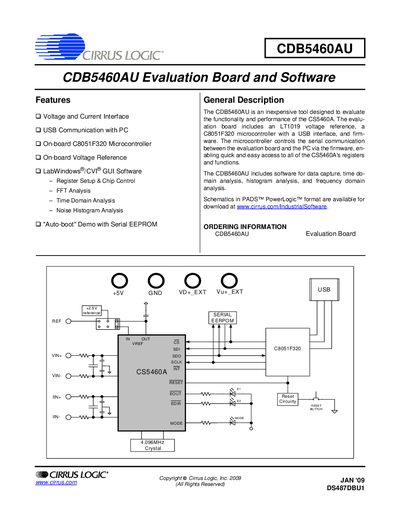
The CDB5460AU evaluation board is a low‑cost tool for evaluating the CS5460A power‑measurement IC. It runs from a single +5 V supply and includes an on‑board LT1019 +2.5 V voltage reference, a C8051F320 microcontroller with USB interface, and configurable analog and digital sections. The board also supports an auto‑boot mode that lets it operate stand‑alone using a serial EEPROM.
The accompanying software, built with LabWindows®/CVI®, runs on Windows 2000/XP and provides a GUI for register access, data capture, and analysis (time‑domain, FFT, histogram). Installation is performed by downloading the package from the Cirrus Logic website and following application note AN278. The GUI includes start‑up, setup, calibration, conversion, pulse‑rate, data‑collection, EEPROM, and debug windows, all accessible via the menu bar.
| Power Supply | Single +5 V |
|---|---|
| Microcontroller | C8051F320 |
| Voltage Reference | LT1019 +2.5 V on‑board reference |
| USB Interface | USB communication with PC |
| Auto‑boot Mode | Stand‑alone operation via serial EEPROM |
Download the software from the Cirrus Logic website and follow application note AN278 for installation.
Place a jumper on J18 (AUTO‑BOOT ENABLE) to activate auto‑boot mode.
You can select the on‑chip VREFOUT, the on‑board +2.5 V LT1019 reference, or an external REF+ source.