
This document is about the product parts of the Epson Stylus Photo RX580 printer. It lists the various components and features of the printer, such as the paper feeder, scanner, ink cartridges, etc. It also provides some tips on how to use and maintain the printer.
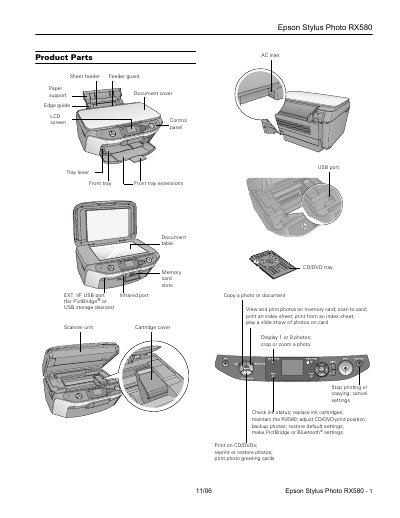
This manual provides instructions for the Epson Stylus Photo RX580, an all-in-one printer that combines printing, scanning, and copying functions. It details the product parts, accessories, and compatible media such as ink cartridges and paper types. The guide explains how to load paper and memory cards, operate the scanner, and perform basic maintenance tasks like cleaning and ink replacement.
| Printing method | On-demand ink jet |
|---|---|
| Ink Configuration | Six individual ink cartridges |
| Sheet feeder capacity | About 120 sheets |
| Printing Width | 17.7 inches (450 mm) |
| Scanner type | Flatbed color Photoelectric device CIS |
| Effective pixels | 10,200 x 14,040 pixels at 1200 dpi |
| Scanning resolution | 1200 dpi (main scan) |
| USB Interface | USB 2.0 Hi-Speed |
The printer uses six individual ink cartridges: black, cyan, magenta, yellow, light cyan, and light magenta.
You can load up to 120 sheets of plain paper into the sheet feeder.
The minimum top margin is 0.12 inch (3.0 mm).