
This document introduces the parts, accessories, and ink cartridges of the Epson Stylus Photo R220 printer. It also reminds users to use genuine Epson cartridges and not to use expired ink cartridges.
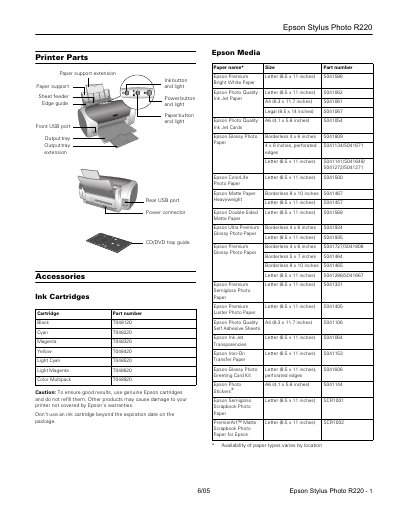
This document is the user manual for the Epson Stylus Photo R220 inkjet printer. It provides an overview of the printer's physical parts, including the sheet feeder, output tray, and USB ports. The manual also details the compatible Epson media and ink cartridges, listing specific part numbers for various paper types such as Epson Premium Letter and Epson Photo Quality.
The guide includes technical specifications for the printer, such as its 90-nozzle configuration, USB 1.1 and 2.0 interfaces, and power consumption. It also features a troubleshooting section that explains the meaning of the control panel lights (green power, red paper, red ink) and provides step-by-step instructions for replacing ink cartridges and checking ink supply levels.
| Printing method | On-demand ink jet |
|---|---|
| Nozzle Configuration | 90 nozzles (each color) x 6 |
| Interfaces | Front USB 1.1, Rear USB 2.0 |
| Sheet feeder capacity | 100 sheets of 17 Ib (65 g/m?) paper |
| Weight | 11.4 Ib (5.2 kg) without ink cartridges |
| Input voltage range | 90 to 264V |
| Power consumption | Approx. 12 W (ISO 10561 Letter Pattern) |
When the red ink light flashes, one or more ink cartridges are low on ink.
When the red ink light stays on, you need to replace the cartridge(s) as one or more are out of ink or not installed.
The minimum top margin is 0.12 inches (3.0 mm).
Charging takes about half a minute.