
This document is the user manual for the Epson PowerLite 6110i projector.
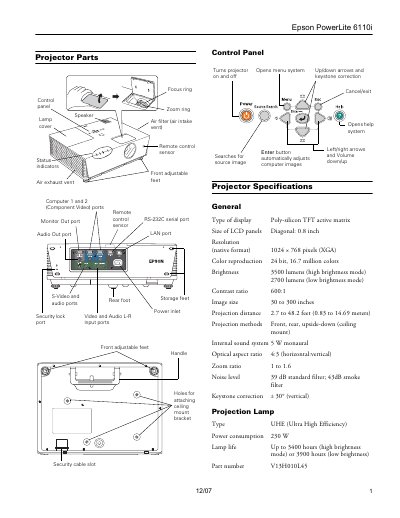
This document provides instructions for the Epson PowerLite 6110i projector, detailing how to position the device, turn it on, and select image sources. It includes troubleshooting steps for blank screens and guidance on connecting computers and video equipment.
| Resolution | 1024 x 768 pixels (XGA) |
|---|---|
| Brightness | 3500 lumens (high brightness mode) |
| Image size | 30 to 300 inches |
| Lamp life | Up to 3400 hours (high brightness mode) |
The projector supports NTSC, PAL, and SECAM international video standards.
Press the orange Power button on top of the projector or on the remote control.