
Key facts
- Manuals
- 2
- Categories
- 2
- Languages
- ZH · EN
- Last added
- 2026-09-29
Featured CD-R manuals
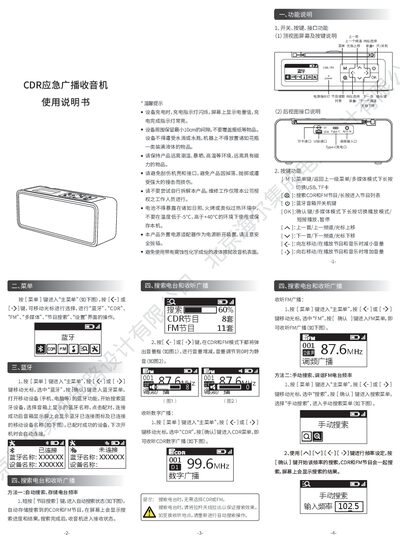
CDR Emergency Broadcast Radio User Manual
The CDR Emergency Broadcast Radio offers CDR and FM digital broadcasting, Bluetooth audio, and multimedia playback. The manual explains the device layout, key functions, and menu navigation for accessing these features.
It details how to search and store radio stations, pair Bluetooth devices, play music from TF cards or USB drives, adjust backlight and power‑saving settings, and perform a factory reset. Safety and warranty information are also included. This manual is written in Chinese.
Covers: Function Overview · Station Search and Reception · Bluetooth Operation · Menu Navigation · Key Functions · Multimedia Playback
CD-R 40X/CD-RE 12X/DVD 16X COM412 three functions vcd player Manual
This manual covers the COM4012 VCD player, a three‑function device that reads and writes CD‑R (40×), CD‑RW (12×) and DVD (16×). It includes safety information for the Class 1 laser used in the unit and details the required handling to avoid exposure to invisible laser radiation.
The document describes the hardware specifications such as the 2 MB internal buffer, IDE/ATAPI interface, and jumper settings for master/slave operation. It also provides step‑by‑step instructions for installation, connection to a host computer, and basic operation of the player.
Covers: Safety Information · Laser Class · Recording Speeds · Hardware Specifications · Interface and Connections · Jumper Settings (Master/Slave)
Latest CD-R manuals
CDR Emergency Broadcast Radio User Manual
User Manual 2 pages · 1.8 MB · ZHThe CDR Emergency Broadcast Radio User Manual provides instructions for operation, Bluetooth pairing, station search, multimedia playback, and settings.
CD-R 40X/CD-RE 12X/DVD 16X COM412 three functions vcd player Manual
User Manual 22 pages · 656 KB · ENThe COM4012 VCD player manual provides safety warnings, specifications, and operating instructions for the CD‑R, CD‑RW, and DVD functions.
Which document do I need?
User Manual
Day-to-day operation, settings and troubleshooting. Start here if the product is already set up.
Questions answered in CD-R manuals
How can I pair a Bluetooth device with the radio?
Open the Bluetooth menu, enable Bluetooth on your phone or computer, select the speaker name shown, and confirm pairing; the device will reconnect automatically on next power‑on.
How do I change the backlight timeout setting?
Enter the Settings menu, choose “背光时间”, and use the left/right keys to select the desired timeout or keep the backlight always on.
What laser class is the COM4012 VCD player?
It is a Class 1 laser product.
From: CD-R 40X/CD-RE 12X/DVD 16X COM412 three functions vcd player Manual
What are the recording speeds for CD‑R, CD‑RW, and DVD?
The device records CD‑R at 40×, CD‑RW at 12×, and DVD at 16×.
From: CD-R 40X/CD-RE 12X/DVD 16X COM412 three functions vcd player Manual