
Key facts
- Brand
- System Sensor
- Model
- RTS151KEY
- Documents
- 2
- Languages
- EN
- Last added
- 2023-10-18
Start here
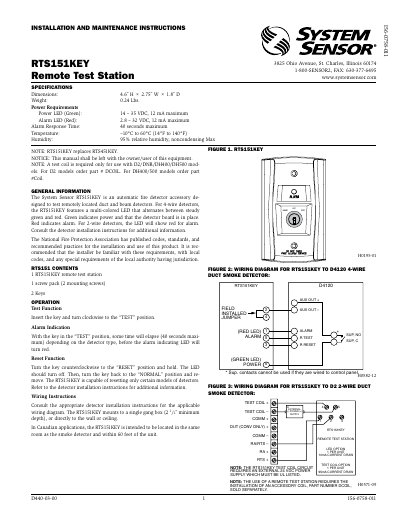
System Sensor RTS151KEY Remote Test Station Installation and Maintenance Instructions
The RTS151KEY is an automatic fire detector accessory designed to test remotely located duct and beam detectors. It features a multi-colored LED that indicates power (green) or alarm (red) status. The unit requires a test coil for certain detector models and can be mounted in a single gang box or directly to walls or ceilings. It operates on 14–35 VDC for power and 2.8–32 VDC for alarm, with a maximum alarm response time of 40 seconds. Wiring diagrams are provided for compatibility with various detector models including D2, DNR, DH400, DH500, and BEAM1224 series.
Read onlineSystem Sensor RTS151KEY specifications
| Dimensions | 4.6˝ H × 2.75˝ W × 1.8˝ D |
|---|---|
| Weight | 0.24 Lbs. |
| Power Requirements (Power LED) | 14 – 35 VDC, 12 mA maximum |
| Power Requirements (Alarm LED) | 2.8 – 32 VDC, 12 mA maximum |
| Alarm Response Time | 40 seconds maximum |
| Temperature Range | –10°C to 60°C (14°F to 140°F) |
| Humidity | 95% relative humidity, noncondensing |
Source: System Sensor RTS151KEY Remote Test Station Installation and Maintenance Instructions
All System Sensor RTS151KEY documents by type
Day-to-day operation, settings and troubleshooting. Start here if the product is already set up.
Mounting, wiring and first power-up. Read it before the hardware goes in.
Questions answered in these manuals
What does the green LED indicate?
Green indicates power and that the detector board is in place.
From: System Sensor RTS151KEY Remote Test Station Installation and Maintenance Instructions
What does the red LED indicate?
Red indicates alarm.
From: System Sensor RTS151KEY Remote Test Station Installation and Maintenance Instructions
What does the green LED indicate?
Green indicates power and that the detector board is in place.
From: System Sensor RTS151KEY(A) Remote Test Station Installation and Maintenance Instructions
What does the red LED indicate?
Red indicates alarm.
From: System Sensor RTS151KEY(A) Remote Test Station Installation and Maintenance Instructions