
Key facts
- Brand
- Mobotix
- Model
- v25
- Category
- Video Player
- Industry
- Electronics
- Documents
- 2
- Languages
- EN
- Last added
- 2026-11-13
Start here
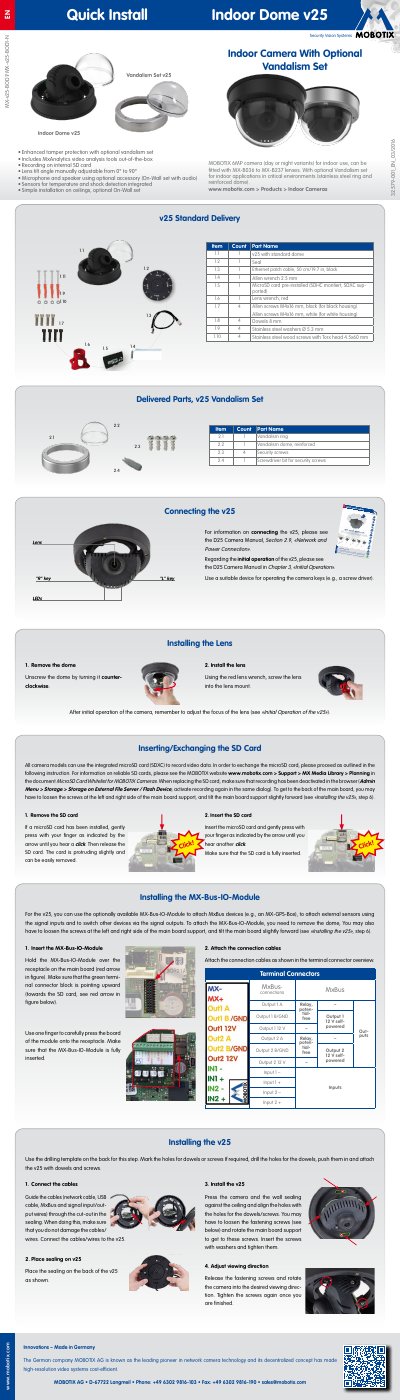
MOBOTIX v25 Indoor Dome Camera Quick Install Guide
This document provides a quick installation guide for the MOBOTIX v25 indoor dome camera. It details the steps for mounting the camera on a ceiling, connecting cables, and installing the optional MX-Bus-IO-Module for external sensors and relays. The guide also explains how to exchange the SD card and install different lenses.
Read onlineMOBOTIX v25 specifications
| Camera Resolution | 6MP |
|---|---|
| Lens Tilt Angle | 0° to 90° |
| Operating Temperature | 0 to +40 °C |
All MOBOTIX v25 documents by type
Day-to-day operation, settings and troubleshooting. Start here if the product is already set up.
Ratings, dimensions and ordering codes, for selection and design work.
Questions answered in these manuals
How do I install the MX-Bus-IO-Module?
Insert the module into the receptacle on the main board ensuring the green terminal connector block points upward, then attach connection cables.
How do I adjust the lens focus?
Remove the dome, activate the focusing aid in the browser, and turn the lens by hand until the red area of the aid is as small as possible.
What is the minimum light sensitivity of the color sensor?
The color sensor has a minimum light sensitivity of 0.1 lux at 1/60 sec.
From: MOBOTIX v25 6MP Indoor Camera Technical Specifications
Is the camera waterproof?
No, the camera is not waterproof and is intended for indoor use only.
From: MOBOTIX v25 6MP Indoor Camera Technical Specifications