
Quick installation guide for the MOBOTIX v25 indoor dome camera, covering mounting, lens adjustment, and MX-Bus-IO-Module setup.
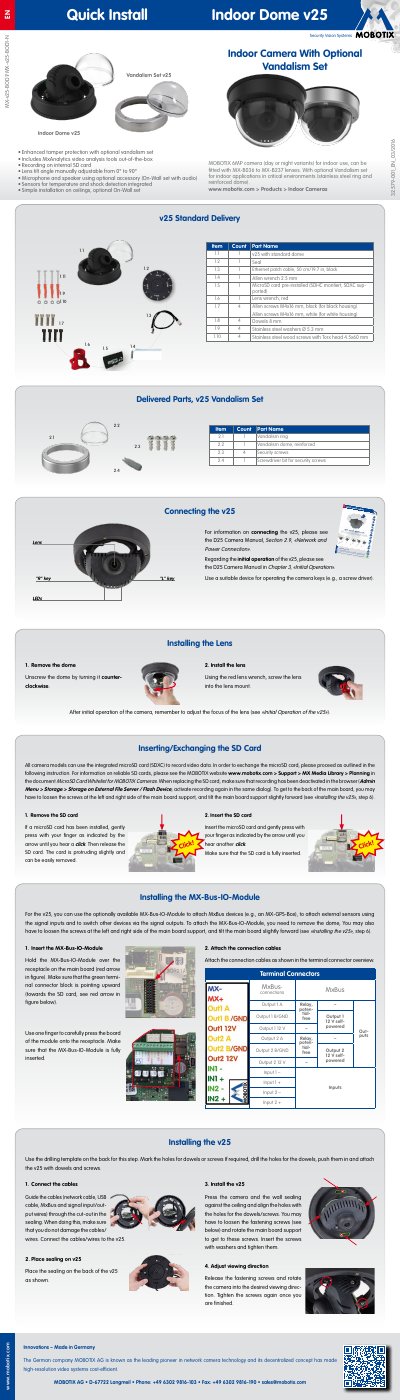
This document provides a quick installation guide for the MOBOTIX v25 indoor dome camera. It details the steps for mounting the camera on a ceiling, connecting cables, and installing the optional MX-Bus-IO-Module for external sensors and relays. The guide also explains how to exchange the SD card and install different lenses.
| Camera Resolution | 6MP |
|---|---|
| Lens Tilt Angle | 0° to 90° |
| Operating Temperature | 0 to +40 °C |
Insert the module into the receptacle on the main board ensuring the green terminal connector block points upward, then attach connection cables.
Remove the dome, activate the focusing aid in the browser, and turn the lens by hand until the red area of the aid is as small as possible.