
Key facts
- Brand
- Mobotix
- Model
- v26
- Category
- Dome Camera
- Documents
- 2
- Languages
- EN
- Last added
- 2026-10-28
Start here
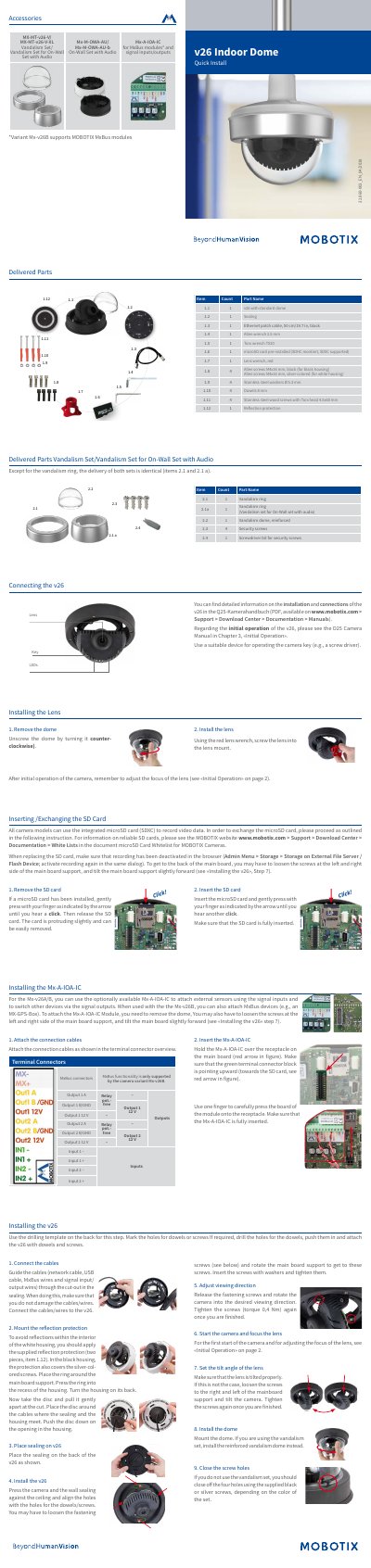
MOBOTIX v26 Indoor Dome Quick Install Guide
This document serves as a quick installation guide for the MOBOTIX v26 Indoor Dome camera. It details the delivered parts, including the camera unit, sealing, cables, and tools required for setup. The guide provides step-by-step instructions for connecting the camera, installing the lens, inserting or exchanging the microSD card, and mounting the device securely to a ceiling or wall.
Read onlineMOBOTIX v26 specifications
| Image Sensor | 1/1,8" CMOS, 6MP |
|---|---|
| Max. Image Size | 6MP (3072x2048) |
| Lens Options | B036 – B237 |
| Power Supply | Power over Ethernet IEEE 802.3af |
| Ambient Temperature | 0 to 40 °C |
| Dimensions | 90 x 150 mm |
All MOBOTIX v26 documents by type
The shortest path to a working setup, usually only a few pages.
Questions answered in these manuals
Which SD cards are supported by the camera?
The camera supports SDHC and SDXC cards for recording video data.
Can the Mx-A-IOA-IC module be used with the Mx-v26A?
Yes, the Mx-A-IOA-IC can be used with the Mx-v26A to attach external sensors and switch devices.
What is included with the v26 Indoor Camera?
The delivered parts include the v26 with standard dome, sealing, Ethernet patch cable, Allen and Torx wrenches, a pre-installed microSD card, lens wrench, mounting screws, washers, dowels and reflection protection.
How do I remove or insert the microSD card?
Press the microSD card gently with your finger until you hear a click, then release it to remove it; to insert a card, press it until it clicks again and make sure it is fully inserted.