
Key facts
- Brand
- Microsoft
- Model
- 2016
- Category
- Other
- Industry
- Electronics
- Documents
- 5
- Languages
- EN · ES
- Last added
- 2026-11-06
Start here
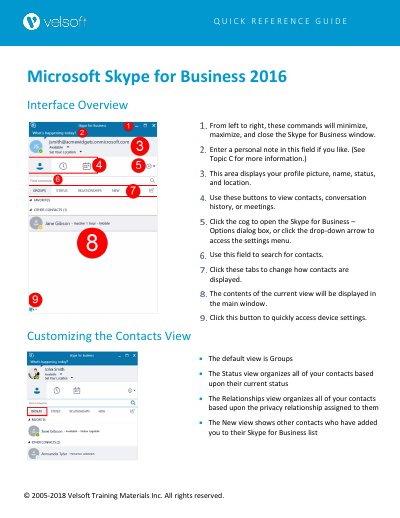
Microsoft Skype for Business 2016 Interface Overview Quick Reference Guide
This guide explains how to manage the Skype for Business 2016 interface, including window controls, profile information, contact views, and settings for audio/video devices. It covers how to customize contact displays, adjust status, and configure options like ringtones, file saving, and meeting preferences. The guide also explains how to show or hide the menu bar for better navigation.
Read onlineMicrosoft 2016 specifications
| Product | Microsoft Outlook 2016 |
|---|---|
| Exam Code | 77-731 |
| Prerequisite Experience | At least six months of Outlook 2016 usage |
Source: Microsoft Outlook 2016 Study Guide for MOS Exam 77-731
All Microsoft 2016 documents by type
The shortest path to a working setup, usually only a few pages.
Day-to-day operation, settings and troubleshooting. Start here if the product is already set up.
Questions answered in these manuals
How do I change how contacts are displayed?
Click the tabs to change how contacts are displayed. The default view is Groups, but you can also choose Status or Relationships views.
From: Microsoft Skype for Business 2016 Interface Overview Quick Reference Guide
How do I open the Skype for Business – Options dialog?
Click the cog icon or the cog drop-down arrow → "Tools → Options:" to open the Skype for Business – Options dialog box.
From: Microsoft Skype for Business 2016 Interface Overview Quick Reference Guide
What exam does this guide prepare for?
It prepares for the Microsoft Office Specialist exam 77-731 for Outlook 2016.
From: Microsoft Outlook 2016 Study Guide for MOS Exam 77-731
What prior experience is required before using this guide?
You should have at least six months of experience using Outlook 2016.
From: Microsoft Outlook 2016 Study Guide for MOS Exam 77-731
What is the objective of this course?
To improve participants' skills in classifying spreadsheet information in Excel with minimal time and effort.
What are the three types of filters available with Autofilter?
The three types are by a list of values, by a format, or by criteria.