
Quick reference guide to navigate and customize the Skype for Business 2016 interface, including window controls, profile settings, contact views, and…
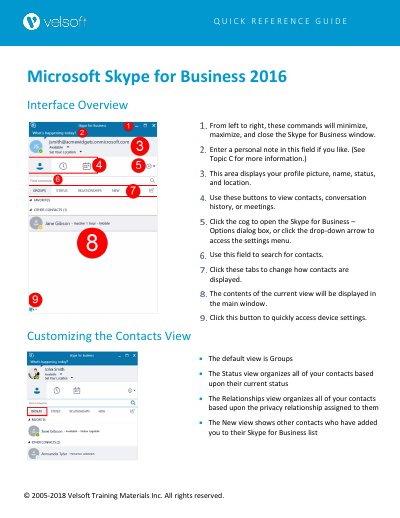
This guide explains how to manage the Skype for Business 2016 interface, including window controls, profile information, contact views, and settings for audio/video devices. It covers how to customize contact displays, adjust status, and configure options like ringtones, file saving, and meeting preferences. The guide also explains how to show or hide the menu bar for better navigation.
Click the tabs to change how contacts are displayed. The default view is Groups, but you can also choose Status or Relationships views.
Click the cog icon or the cog drop-down arrow → "Tools → Options:" to open the Skype for Business – Options dialog box.
Use the Status category in the Options dialog to control when your status changes automatically.