
Key facts
- Brand
- FujiFilm
- Model
- X-A3
- Category
- Digital cameras
- Industry
- Electronics
- Documents
- 4
- Languages
- EN · ZH
- Last added
- 2026-09-30
Start here
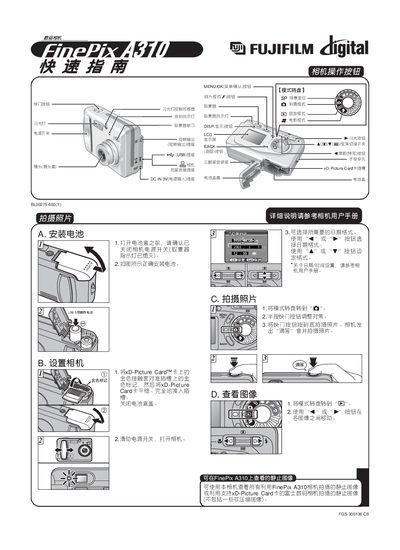
FUJIFILM FinePix A310camera QuickStart Guide
This guide introduces the basic functions of the Fujifilm FinePix A310 camera, including how to install the battery, select shooting modes, use the shutter button, and insert the xD‑Picture Card. It also explains the operation of the LCD screen, viewfinder indicators, and flash controls.
The document provides step‑by‑step instructions for connecting the camera to a computer, installing the accompanying software, setting the USB mode to card‑reader, and transferring images. It covers saving images to the PC, viewing them with FinePixViewer, and basic troubleshooting tips. This manual is written in Chinese.
FUJIFILM X-A3 specifications
| Battery type | AA‑size alkaline (2) or AA‑size Ni‑MH rechargeable (2) |
|---|---|
| Storage media | 16 MB xD‑Picture Card (1) |
| Power‑save timeout | LCD turns off after 60 seconds of inactivity |
Source: Fujifilm FinePix A345 / A350 Digital Camera Owner's Manual
All FUJIFILM X-A3 documents by type
Day-to-day operation, settings and troubleshooting. Start here if the product is already set up.
The shortest path to a working setup, usually only a few pages.
Questions answered in these manuals
How do I load the batteries?
Open the battery cover, insert two AA batteries with the correct polarity markings, then close the cover.
From: Fujifilm FinePix A345 / A350 Digital Camera Owner's Manual
What should you do if the power-supply cord is damaged?
You must unplug the video product and refer servicing to qualified service personnel.
What happens if you place the camera on an unstable surface?
The camera may fall or tip over and cause injury.
What batteries does the FinePix A330/A340 use?
The camera uses LR6 AA‑size alkaline batteries.
How can I connect the camera to a TV?
Use the VIDEO OUT socket on the camera to connect to a TV.