
Key facts
- Brand
- EXAR
- Model
- XR21V1410
- Category
- demo board
- Industry
- Electronics
- Documents
- 4
- Languages
- EN
- Last added
- 2026-11-17
Start here
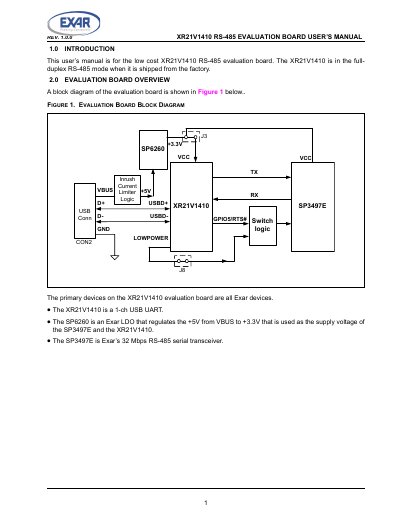
Exar XR21V1410 RS-485 Evaluation Board User's Manual
This user's manual describes the XR21V1410 RS-485 evaluation board from Exar. It explains the board block diagram, identifies the primary Exar devices, and lists the board components, headers, and jumpers.
The board can be configured for full-duplex or half-duplex RS-485 operation. Full-duplex is the factory default; installing jumper J5 enables half-duplex control. The manual also gives driver and support contact information and a revision 1.x board note.
Exar XR21V1410 specifications
| Primary USB UART | XR21V1410, 1-channel USB UART |
|---|---|
| RS-485 transceiver | SP3497E, 32 Mbps |
| LDO regulator | SP6260, 150 mA RF ultra low dropout |
| Regulated supply voltage | +3.3 V |
| Default RS-485 mode | Full-duplex |
| Mode selection jumper | J5 |
Source: Exar XR21V1410 RS-485 Evaluation Board User's Manual
All Exar XR21V1410 documents by type
Day-to-day operation, settings and troubleshooting. Start here if the product is already set up.
Ratings, dimensions and ordering codes, for selection and design work.
Questions answered in these manuals
What is the XR21V1410?
It is a 1-channel USB UART from Exar.
What is the default RS-485 mode of the evaluation board?
The board defaults to full-duplex RS-485 mode; leaving jumper J5 open sets this mode.
What is the default configuration of the XR21V1410 evaluation board?
The board is configured for RS-232 mode by default.
What type of cable can be connected to the DB9 connector?
A null modem cable can be connected to the DB9 connector to communicate with another serial port.
What is the default operating mode of the evaluation board?
The board is set to RS-232 mode by default.
Has the onboard I2C EEPROM been programmed?
No, the I2C EEPROM has not been programmed.