
User manual for the Exar XR21V1410 RS-485 evaluation board, covering components, headers and jumpers, full- and half-duplex configuration, and support.
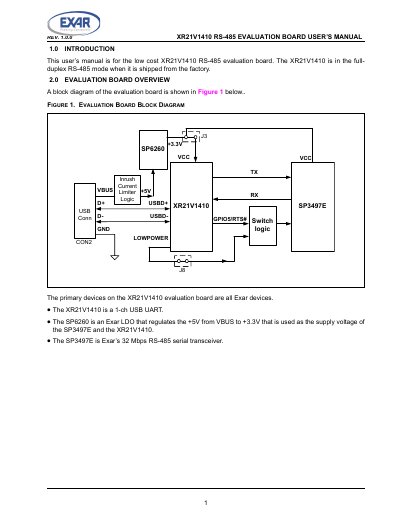
This user's manual describes the XR21V1410 RS-485 evaluation board from Exar. It explains the board block diagram, identifies the primary Exar devices, and lists the board components, headers, and jumpers.
The board can be configured for full-duplex or half-duplex RS-485 operation. Full-duplex is the factory default; installing jumper J5 enables half-duplex control. The manual also gives driver and support contact information and a revision 1.x board note.
| Primary USB UART | XR21V1410, 1-channel USB UART |
|---|---|
| RS-485 transceiver | SP3497E, 32 Mbps |
| LDO regulator | SP6260, 150 mA RF ultra low dropout |
| Regulated supply voltage | +3.3 V |
| Default RS-485 mode | Full-duplex |
| Mode selection jumper | J5 |
It is a 1-channel USB UART from Exar.
The board defaults to full-duplex RS-485 mode; leaving jumper J5 open sets this mode.
Jumper J5 switches between the full-duplex and half-duplex RS-485 modes.
Send an e-mail to [email protected].