
User manual for the Exar XR21V1410 RS-232 evaluation board, covering its components, headers and jumpers, and RS-232 configuration.
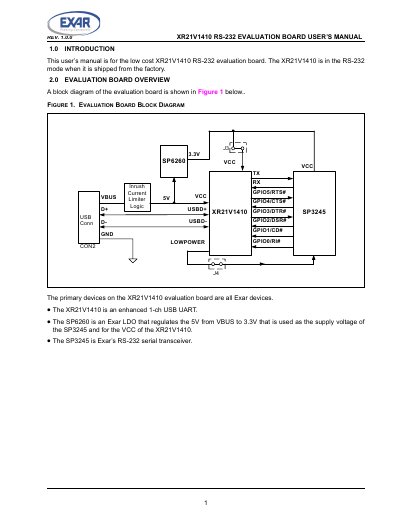
This user's manual describes the low-cost Exar XR21V1410 RS-232 evaluation board. The primary devices on the board are Exar devices: the XR21V1410 enhanced 1-channel USB UART, the SP6260 LDO, and the SP3245 RS-232 serial transceiver.
The manual lists board components and installed and uninstalled headers/jumpers, explains the default RS-232 mode and the SP3245 shutdown mode, and gives an email contact for drivers and technical support.
| UART | Enhanced 1-channel USB UART |
|---|---|
| LDO regulator | 150mA RF Ultra Low Dropout Regulator |
| LDO function | Regulates 5V from VBUS to 3.3V |
| RS-232 transceiver | RS-232 serial transceiver |
| RS-232 connector | DB9 male connector |
| EEPROM | I2C Serial EEPROM |
| Default board mode | RS-232 |
The board is configured for RS-232 mode by default.
A null modem cable can be connected to the DB9 connector to communicate with another serial port.
Send an e-mail to [email protected].
They are at high impedance, allowing the UART I/Os to connect directly with an external UART or serial transceiver.