
Key facts
- Brand
- Collihigh
- Model
- JWSK-6
- Category
- Other Electronics
- Industry
- Industrial
- Documents
- 3
- Languages
- ZH
- Last added
- 2012-03-19
Start here
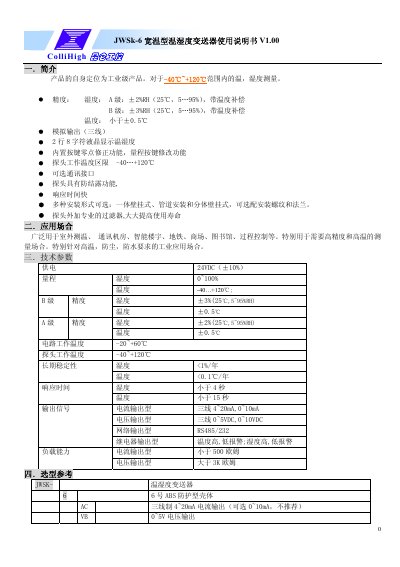
ColliHigh JWSK-6 Temperature and Humidity Transmitter User Manual
The document provides a user guide for the ColliHigh JWSK-6 Temperature and Humidity Transmitter, an industrial-grade device designed for measuring temperatures from -40°C to +120°C. It details product features such as analog output options (current/voltage), RS485/RS232 network interfaces, and relay alarm outputs. This manual is written in Chinese.
Read onlineColliHigh JWSK-6 specifications
| Temperature Range (Probe) | -40...+120°C |
|---|---|
| Humidity Accuracy (Class A) | ±2%RH |
| Temperature Accuracy | <±0.5°C |
| Power Supply | 24VDC (±10%) |
Source: ColliHigh JWSK-6 Temperature and Humidity Transmitter User Manual
All ColliHigh JWSK-6 documents by type
Day-to-day operation, settings and troubleshooting. Start here if the product is already set up.
Questions answered in these manuals
What is the password to enter parameter settings?
The password required to modify parameters is 007.
From: ColliHigh JWSK-6 Temperature and Humidity Transmitter User Manual
What are the supported baud rates?
The device supports baud rates of 1200, 2400, 4800, and 9600.
From: ColliHigh JWSK-6 Temperature and Humidity Transmitter User Manual
What is the power supply requirement for the transmitter?
The transmitter requires a DC 24V power supply, with an operating range of 22V to 26V.
From: ColliHigh JWSK-6 Series Explosion-Proof Temperature and Humidity Transmitter User Manual
What are the wiring colors for the transmitter?
The wiring colors are Red for V+ (Power +), Black for GND (Power -), Yellow for Temperature (T), and Blue for Humidity (H).
From: ColliHigh JWSK-6 Series Explosion-Proof Temperature and Humidity Transmitter User Manual
What power supply voltage does the JWSK-6 transmitter require?
It requires a DC 24 V supply, with an acceptable range of 22 V to 26 V.
How can the communication address be changed?
Enter the address‑modification mode via the keypad and send the command, e.g., 01060002000 2A9CB, to set a new address.