
Troubleshooting and user guide for the Zebra LP 2824 Plus printer, covering feed button modes and manual calibration.
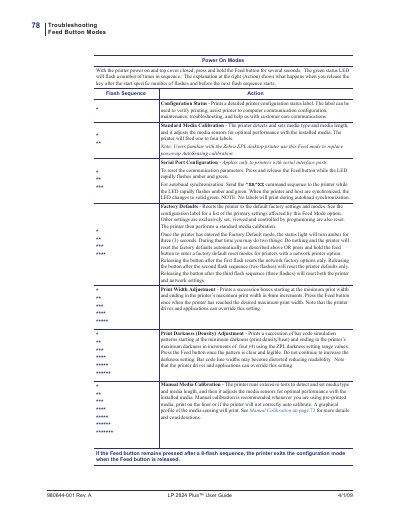
This user guide covers troubleshooting and configuration for the Zebra LP 2824 Plus printer. It explains feed button modes such as configuration status, standard media calibration, serial port configuration, factory defaults, print width adjustment, print darkness adjustment, and manual media calibration.
Manual calibration is described step by step, including loading media, turning on the printer, pressing the Feed button through flash groups, and feeding a blank label to verify operation.
| Print width adjustment increment | 4mm increments |
|---|---|
| Print darkness adjustment increment | increments of four (4) |
It prints a detailed printer configuration status label.
It is recommended when using pre-printed media or if the printer will not correctly auto calibrate.
The printer resets to default factory settings and modes, then performs a standard media calibration.
Press and release the Feed button while the LED flashes amber and green, then send the ^XA^XZ command sequence.