
Yale Digital Padlock User Manual explains charging, fingerprint registration, indicator lights, and factory reset for the Yale digital padlock.
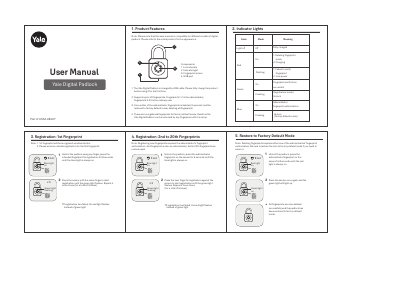
The Yale Digital Padlock is a USB-rechargeable fingerprint padlock made by Yale, part of ASSA ABLOY. This user manual describes its components, charging process, fingerprint registration, and operation modes.
It covers administrator and ordinary user fingerprints, indicator light meanings, registration steps for the first and additional fingerprints, and how to restore the lock to factory default mode.
| Fingerprint capacity | Up to 20 fingerprints |
|---|---|
| Charging method | USB cable |
| Administrator fingerprint | 1st fingerprint |
It supports up to 20 fingerprints.
It is charged by USB cable and should be fully charged before first use.
The product restores to factory default mode and deletes all fingerprints.
Yes, because no fingerprints are registered in factory default mode until setup.