
Victron Energy Color Control GX manual covering power, product connections, internet access and VRM Portal monitoring.
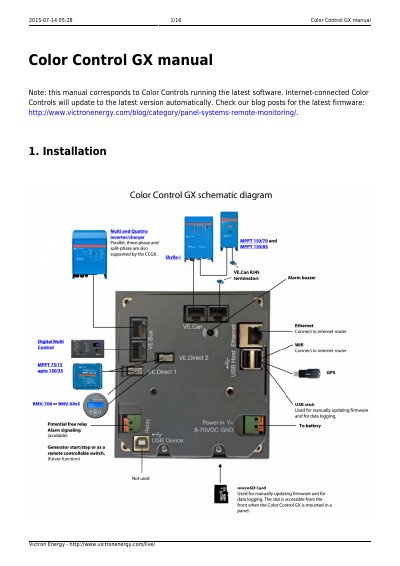
The Color Control GX (CCGX) manual from Victron Energy corresponds to Color Controls running the latest software and covers installation and connections. It explains powering the CCGX on the Power IN V+ connector, which accepts 8 to 70 V DC, and gives isolation notes for VE.Bus, VE.Direct, VE.Can, USB and Ethernet ports.
It describes connecting Victron products such as Multis, Quattros and Inverters on VE.Bus; BMV-700 series and MPPTs on VE.Direct; Skylla-i, Lynx Shunt VE.Can, Lynx Ion + Shunt and MPPTs on VE.Can; BMV-600 series; and the DC Link box. It also covers internet connectivity for the VRM Portal through Ethernet, a supported Wi-Fi USB dongle, a 3G or 4G router or USB tethering, and includes IP configuration.
| Power input | 8 to 70 V DC |
|---|---|
| Direct VE.Direct connections | Up to two products |
| VE.Direct cable length | Maximum 10 meters |
| USB ports | Two |
| Supported Wi-Fi security | WEP, WPA and WPA2 |
| Supported USB Wi-Fi dongles | Two supported dongles |
| VE.Can termination | Required on both ends |
It accepts 8 to 70 V DC on the Power IN V+ connector.
Up to two such products can be connected directly on the back of the CCGX.
VE.Direct cables have a maximum length of 10 meters.
Yes. With a USB Wi-Fi dongle, it can connect to WEP, WPA and WPA2 secured networks.