
The Victron Energy Color Control GX User Manual provides installation, connection, internet setup, and configuration instructions for the CCGX device.
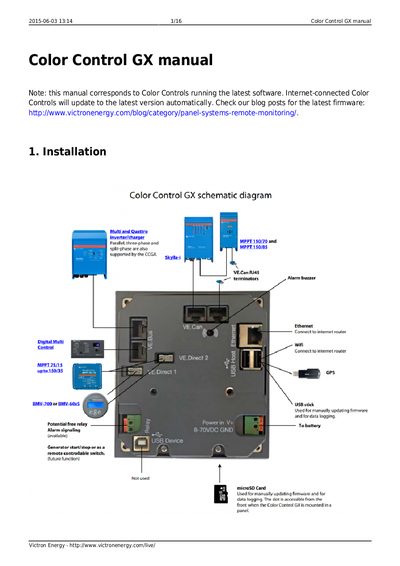
This manual explains how to install and connect the Color Control GX (CCGX) to various Victron products such as VE.Bus, VE.Direct and VE.Can devices. It covers power input requirements, port isolation, and wiring details for single and multiple system configurations.
The guide also details internet connectivity options—including Ethernet, Wi‑Fi dongles, cellular routers, and USB tethering—along with GPS integration, firmware updates, logging settings, and configurable parameters for system monitoring via the VRM portal.
| Power input voltage range | 8 V – 70 V DC |
|---|---|
| VE.Bus port isolation | Isolated |
| VE.Direct port isolation | Isolated |
| VE.Can port isolation | Isolated |
| USB port isolation | Not isolated |
| Ethernet port isolation | Isolated (shielded only) |
| Supported GPS protocol | NMEA0183 |
It accepts 8 to 70 V DC on the Power IN V+ connector.
You can use the Ethernet LAN port, a Wi‑Fi USB dongle, a 3G/4G router, or USB tethering on a mobile phone.
The VE.Bus, VE.Direct and VE.Can ports are isolated, while the USB ports are not.