
Setup sheet for the Verifone Ruby MK3780 Fusion Scanner with bar codes for configuring the scanner to a Ruby Console, including COM port, baud rate and…
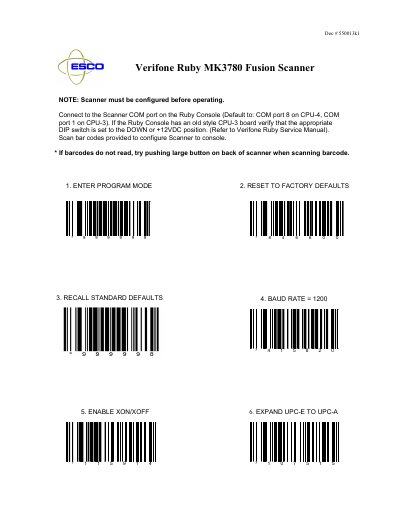
This document provides setup instructions for the Verifone Ruby MK3780 Fusion Scanner used with a Ruby Console. It explains that the scanner must be configured before operating, how to connect it to the Scanner COM port on the Ruby Console (COM port 8 on CPU-4, COM port 1 on CPU-3), and how to verify the DIP switch position on an old style CPU-3 board.
The rest of the sheet consists of configuration bar codes to scan in sequence: entering program mode, resetting to factory defaults, recalling standard defaults, setting the baud rate to 1200, enabling XON/XOFF, expanding UPC-E to UPC-A, converting UPC-A to EAN-13, setting programmable prefix characters and code bytes, disabling Codegate, and exiting with save and reset.
| Default COM port (CPU-4) | COM port 8 |
|---|---|
| Default COM port (CPU-3) | COM port 1 |
| Baud rate | 1200 |
| Flow control | XON/XOFF enabled |
It connects to the Scanner COM port, defaulting to COM port 8 on CPU-4 and COM port 1 on CPU-3.
Verify that the appropriate DIP switch is set to the DOWN or +12VDC position, as described in the Verifone Ruby Service Manual.
The configuration sets the baud rate to 1200.
Try pushing the large button on the back of the scanner when scanning the bar code.