
This document describes how to use the VeriFone MX915 and Motorola QR Reader.
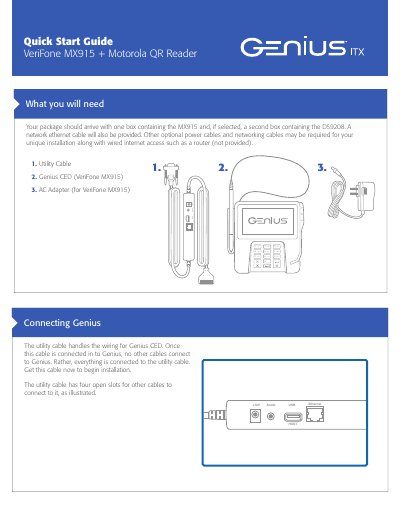
This Quick Start Guide explains how to set up the Genius CED, a customer engagement device based on the VeriFone MX915, optionally together with the Motorola DS9208 QR reader used for LevelUp transactions. It lists what should arrive in the package, including the MX915, the DS9208 (if selected), the AC adapter and a network Ethernet cable.
The guide describes connecting the utility cable, which carries power, audio, USB and Ethernet to the Genius CED, removing the communications module to route the cable through a countertop, connecting the +12V power cable and the Ethernet cable to a router or switch, and verifying that the CED is ready using a keypad password. It also covers installing the DS9208 on the counter and connecting it to the utility cable, and notes that multi-lane stores need one Genius CED per lane.
| IP settings | Dynamic (shipped default) |
|---|
Press the 0 key three times, then enter the password 9416557. The CED should display an information screen where you can verify the IP Address field is populated.
Merchant Warehouse support is available at 1-800-498-0823, Option 1, then Option 2.
One Genius CED per lane is required. For example, a five-lane location would need 5 Genius CEDs, five power outlets and five Ethernet ports.
The QR reader is used for all LevelUp transactions and may be used for more options in the future, including gift and loyalty programs.