
The TP-Link TL-WDR7632 user manual provides setup, configuration, and troubleshooting instructions for the Gigabit Easy Expand AC1900 dual‑band router.
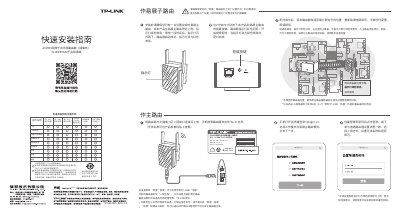
The TL-WDR7632 is a wall‑plugged Gigabit dual‑band router that can operate as a main router, an Easy‑Expand sub‑router, or a wireless extender. It supports the Easy‑Expand feature, allowing up to eight TP‑Link routers to form a distributed Wi‑Fi network.
Setup is performed via the web interface at tplogin.cn, where you can select the operating mode, create an administrator password, and configure WAN and Wi‑Fi settings. The manual also explains LED indicator meanings, how to reset the device, and warranty/service information. This manual is written in Chinese.
| Model | TL-WDR7632 |
|---|---|
| Wireless Standard | AC1900 dual‑band Gigabit |
| Power Input | 100‑240 V~, 50/60 Hz, 0.3 A |
| Maximum Easy‑Expand Units | 8 routers (1 + 7) |
Power the router on, then press and hold the RESET button on the bottom until the system LED flashes, then release.
If using a wired connection, ensure the computer is set to obtain IP address and DNS automatically; also check browser settings and clear cache.
The router is searching for or pairing with the main Easy‑Expand router.
Up to eight routers (one main router plus seven sub‑routers) can be linked in a distributed Wi‑Fi network.