
The Samsung NX-M lens manual provides installation, operation, specifications, safety tips, and maintenance guidance for the 9mm and 9‑27mm lenses.
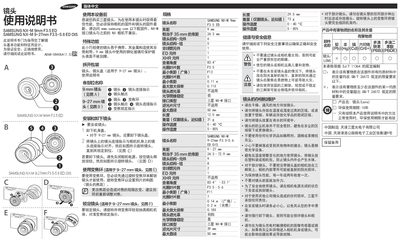
This manual explains how to safely install, use, and maintain Samsung's NX-M mount lenses. It includes step‑by‑step instructions for attaching and removing the lenses, operating the zoom ring, and locking the lens, as well as detailed specifications for each model.
Safety information, storage recommendations, and environmental disposal instructions are also covered, helping users keep the lenses in optimal condition and comply with waste regulations. This manual is written in Chinese.
| Focal Length (9mm lens) | 9 mm |
|---|---|
| Maximum Aperture (9mm lens) | F3.5 |
| Minimum Focus Distance (9mm lens) | 0.11 m |
| Weight (9mm lens) | 31 g |
| Optical Image Stabilizer (9‑27mm lens) | Yes |
| Focal Length (9‑27mm lens) | 9–27 mm |
| Maximum Aperture (9‑27mm lens) | F3.5–5.6 |
| Minimum Focus Distance (9‑27mm lens, wide) | 0.14 m |
| Weight (9‑27mm lens) | 73 g |
Remove the body cap (and the lens cap for the 9‑27mm lens), align the lens mount index with the camera’s mount index, then rotate the lens until it locks into place.
The manual warns not to stare at the sun through the lens or camera because it can cause severe eye damage.
Store the lens in a dry, well‑ventilated area, avoid direct sunlight without a cap, keep it away from water and extreme temperature or humidity, and use a protective bag or case.
The minimum focus distance for the wide end of the 9‑27mm lens is 0.14 m.