
PROMAX PROLITE-105 quick reference guide covering the front and top view controls, laser light sources, charge LEDs and safety warnings.
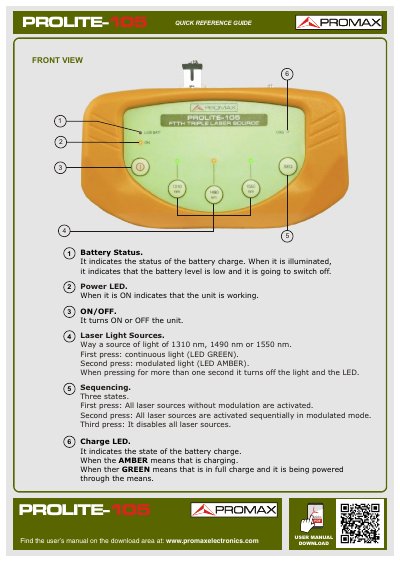
This two-page quick reference guide describes the front and top view of the PROMAX PROLITE-105 light source. It explains the battery status indicator, power LED, ON/OFF control, the laser light sources at 1310 nm, 1490 nm or 1550 nm, the sequencing of the sources, and the charge LED.
The guide also identifies the SC/APC connector, the external power input and the anchor point for a conveyor belt, and it includes a caution about looking directly at the light beam. The full user's manual is available in the download area at www.promaxelectronics.com.
| Light source wavelengths | 1310 nm, 1490 nm or 1550 nm |
|---|---|
| Connector | SC/APC |
| External power input | Provided (top view item 9) |
Use the ON/OFF control, which turns the unit ON or OFF.
The first press gives continuous light with a green LED, and the second press gives modulated light with an amber LED.
An amber charge LED means the battery is charging; green means it is fully charged and being powered through the means.
When it is illuminated, the battery level is low and the unit is going to switch off.