
This is a quick reference guide that introduces the functions of Cable Ranger + / 3.1.
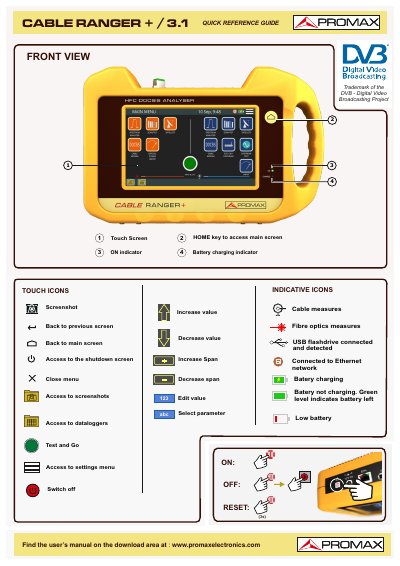
The Promax Cable Ranger + / 3.1 quick reference guide shows how to use the device's touch-screen icons, front keys, and main settings menu. It includes access to the home screen, shutdown screen, settings, screenshots, dataloggers, and Test & Go functions.
The guide lists screens for spectrum analysis, scan/tilt, DOCSIS analyzer, external cable modem upstream spectrum, optical power meter, and satellite band functions. It also identifies connectors for power, Ethernet, USB flashdrive, PC, fiber optics, F/F or F/BNC adapters, and RF input.
| Power input | 12 V DC |
|---|---|
| Network connector | Ethernet |
| USB connector | USB flashdrive device |
| PC connector | Mini-USB |
| Fiber optics input | SC-APC connector |
| RF and external modem input | Universal connector for F/F or F/BNC adapter |
| OFDM DS availability | Cable Ranger 3.1 |
The user manual is available in the download area at www.promaxelectronics.com.
The HOME key accesses the main screen.
OFDM DS is only available for Cable Ranger 3.1.
A Mini-USB connector is used for PC connection.