
The Philips HMP8100 Quick Start Guide shows how to set up the device, connect HDMI, use the remote, and access online services.
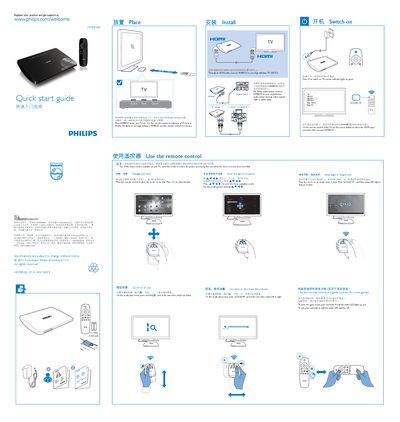
This guide explains the basic operation of the HMP8100 media player. It covers turning the device on, using the remote control for navigation, connecting the unit to a TV via HDMI, and adjusting volume and image settings.
It also describes how to connect the HMP8100 to the Internet using Wi‑Fi or an Ethernet cable, install and launch apps from the HiMarket store, and use USB or SD/SDHC storage for media playback. Additional tips include using game mode on compatible TVs and accessing system settings such as language and network configuration. This manual is written in Chinese.
| Power indicator color | Green when on |
|---|---|
| Remote control operating distance | 0.5 to 6 m |
Press the power button; the green power indicator will light up.
You can connect via Wi‑Fi in the settings menu or use an Ethernet cable.