
User manual for the Philips E500 mobile phone covering installation, operation, and troubleshooting.
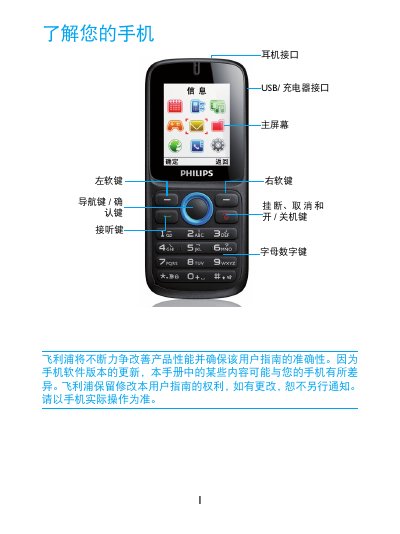
This manual provides instructions for the Philips E500 mobile phone, including how to install the SIM card and Micro SD card, charge the battery, and use the main screen and keypad. It details features such as making calls, sending messages, managing the phonebook, and playing music and pictures stored on the Micro SD card. This manual is written in Chinese.
| SAR Value | 0.912 W/kg |
|---|---|
| Compliance Standard | GB21288-2007 |
Press and hold the '5' key to lock the keyboard. To unlock, press the left soft key first, then press the '5' key.
Yes, you can use the phone while it is charging.