
This user manual provides instructions for charging, connecting via Bluetooth or USB, and using the PASCO PS-3209 Wireless Weather Sensor with GPS.
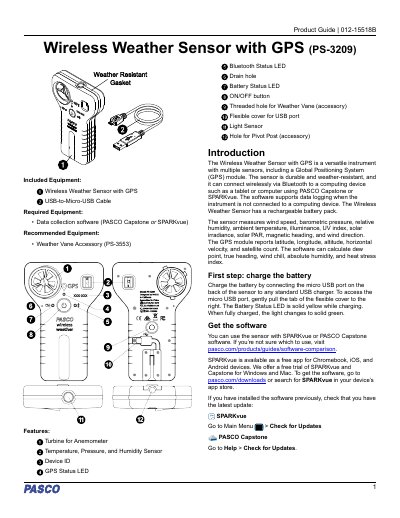
The PASCO Wireless Weather Sensor with GPS (PS-3209) is a durable, weather-resistant instrument designed to measure wind speed, temperature, humidity, pressure, illuminance, UV index, solar irradiance, and more. It features an integrated GPS module for reporting latitude, longitude, altitude, and velocity. The sensor connects wirelessly via Bluetooth or through a micro USB cable to computing devices running PASCO Capstone or SPARKvue software.
| Wind Speed Measurement Range | At least 0.5 m/s for accurate measurement |
|---|---|
| Temperature Units | °F, °C, or K |
| Relative Humidity Unit | Percentage |
| Barometric Pressure Units | kPa, psi, N/m2, atm, torr, hPa, inHg, mmHg, mbar, Pa, or inH 2O |
| Absolute Humidity Unit | g/m3 |
Connect the micro USB port on the back of the sensor to any standard USB charger. The Battery Status LED will be solid yellow while charging and turn solid green when fully charged.
You can use SPARKvue or PASCO Capstone. SPARKvue is available as a free app for Chromebook, iOS, and Android devices.
No. While the sensor is rugged and weather-resistant, it is not waterproof. Exposure to liquid water may cause inaccuracies in collected data.
Do not try to measure high-speed wind, such as from leaf-blowers or severe storms.