
Settings checklist for the OPPO BDP-80 covering setup wizard, playback, parental control, language, video, audio, speaker, device and network options.
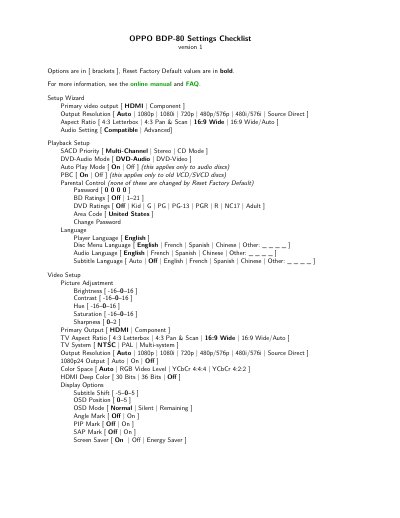
This is version 1 of the OPPO BDP-80 Settings Checklist, dated 2010.01.25. It lists the player's setup options with the available choices shown in brackets and the Reset Factory Default values shown in bold, and it points readers to the online manual and FAQ for more information.
The checklist runs through the Setup Wizard (primary video output, output resolution, aspect ratio and audio setting), Playback Setup (SACD priority, DVD-Audio mode, auto play mode, PBC), Parental Control, Language, Video Setup with Picture Adjustment and Display Options, Audio Format Setup, Audio Processing with speaker configuration and down mix, and Device and Network Setup.
The password field shows 0 0 0 0.
The Parental Control settings are not changed, and the remote control code is also not changed by Reset Factory Default.
The listed options are Auto, 1080p, 1080i, 720p, 480p/576p, 480i/576i and Source Direct.
The checklist notes a default of Bitstream when the Setup Wizard is set to Advanced.