
The Omron HV-F128 TENS Device User Manual explains battery installation, electrode connection, pad attachment, stimulation use, maintenance, cleaning, and…
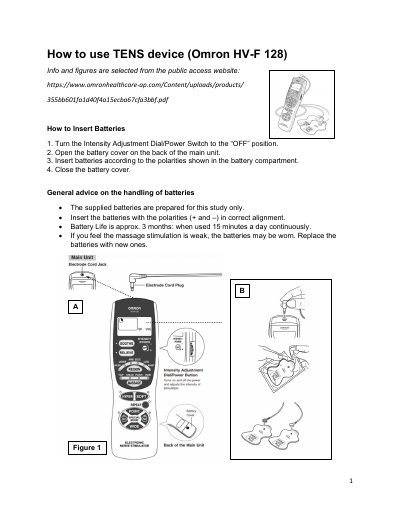
The Omron HV-F128 is a TENS device used to apply electrical stimulation. The manual describes how to insert batteries, connect the electrode cord, attach the pads to the skin, and operate the intensity dial for stimulation sessions.
It also provides advice on maintaining the long-life pads, cleaning the main unit without getting water inside, troubleshooting common problems, and accessing live and video tutorials included with the study package.
| Battery life | approx. 3 months |
|---|---|
| Pad lifespan | up 150 uses or 5 months |
| Automatic shut-off if pad detaches | approximately 7 seconds |
| Automatic shut-off after stimulation | approximately 15 minutes |
| Intensity levels | 1 to 6 |
Battery life is approximately 3 months when used 15 minutes a day continuously.
The unit turns off automatically in approximately 7 seconds. Re-attach the pads correctly and turn the power on again.
The power turns off automatically in approximately 15 minutes after stimulation starts.
The long-life pads are good for up to 150 uses or 5 months based on daily usage.