
Norbar Torque Tester 34292 User Manual

This user manual provides initial use instructions, button functions, mode settings, and troubleshooting guides for the Norbar Torque Tester model 34292.
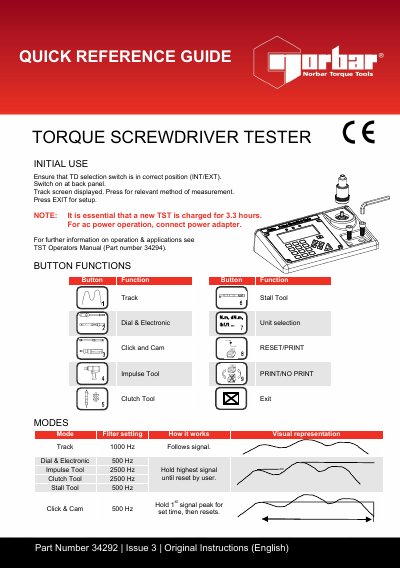

Norbar Torque Tester 34292 User Manual - cover page
Brand
norbar
Document type
User Manual
Language
English
Pages
2
File format
PDF
File size
333 KB
Published
27 October, 2026
Updated
27 October, 2026
MD5 checksum
F3CCC4612785A2540D3C008561168877

About this manual

The document serves as a quick reference guide for the Norbar Torque Tester (Part Number 34292), detailing initial setup steps such as ensuring the TD selection switch is in the correct position and charging the battery. It outlines specific button functions like Track, Stall Tool, Dial & Electronic Unit selection, and Impulse Tool.

What's inside

  • Initial Use
  • Button Functions
  • Modes
  • Quick Reference Guide
  • Settings
  • Troubleshooting's Guide

Frequently asked questions

How long must a new Track Stall Tool be charged before initial use?

It is essential that a new TST is charged for 3.3 hours.

What is the range of variable filter settings available for the device?

The frequency can be set from 100Hz to 2500Hz.

How many seconds are available for the Auto Reset Hold Time setting?

The user can select a hold time of 1, 2, 3, or 4 seconds.

Download PDF (333 KB)

More norbar Manuals


View all norbar manuals →