
Quick start guide for the Marshall Electronics CV345-CS/CV345-CSB HD-SDI cameras: lens mounting, rear panel connections, OSD menu setup and specifications.
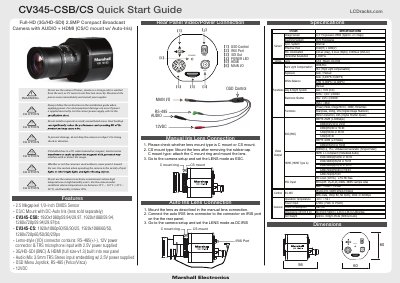
This quick start guide covers the Marshall Electronics CV345-CS and CV345-CSB compact HD-SDI cameras with HDMI output. It explains how to mount a manual iris lens (C mount or CS mount) and an auto iris lens, including setting the LENS mode to ESC or DC IRIS in the camera setup, and it identifies the rear panel items: OSD control, SDI out, power LED, HDMI, main I/O and IRIS port.
The guide also lists features, dimensions and a full specification table (image sensor, effective pixels, minimum illumination, horizontal resolution, video output, HDMI, lens, white balance, shutter, day/night, audio, RS-485 control, operating temperature, power and weight), followed by a setup menu reference describing each OSD sub-menu such as IRIS, WB control, AE control, back light, day/night, image stabilizer, audio and display control.
| Image Sensor | 1/3" Progressive CMOS (approx. 2.1 megapixel) |
|---|---|
| Effective Pixel | 1920 (H) x 1080 (V) |
| Minimum Illumination | 0.2 Lux (Day), 0.1 Lux (Night), 0.005 Lux (DSS on) |
| Horizontal Resolution | 1,000 TVL |
| Lens Mount | C/CS mount, DC-IRIS |
| SDI Video Output | SMPTE 292M (1.485 Gbps) and SMPTE 424M (2.97 Gbps) |
| HDMI Output | HDMI 1.3 compliant with embedded audio |
| Control Protocol | PELCO-P/D, SONY-VISCA |
| Control Serial Format | 8 bits data, 1 stop bit, no parity, 2400~115200 bps |
| Operating Temperature | -10°C ~ 50°C |
| Power Input | 12 VDC (7 VDC to 15 VDC) |
| Power Consumption | Max 6 W |
| Dimensions (W x H x D) | 60 x 60 x 56 mm / 2.36 x 2.36 x 2.20 inches |
| Net Weight | Approx. 160 g / 0.35 Lbs (without lens) |
For a C mount lens, attach the C mount ring and then mount the lens, and set the LENS mode to ESC in the camera setup.
Connect the auto IRIS lens connector to the IRIS port on the rear panel, then set the LENS mode to DC IRIS in the camera setup.
Use the camera between 14°F and 122°F (-10°C ~ 50°C) with humidity below 90%.
The D-ZOOM function enlarges the video output digitally up to 16X.