
Quick start guide for the LTC2449 8/16 channel 24-bit delta-sigma ADC and DC742 demo board: jumper setup, DC590 connection and experiments.
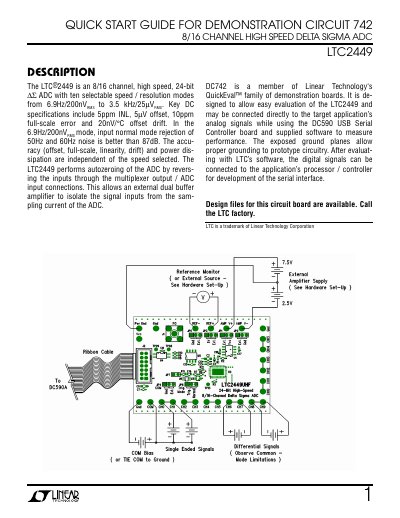
This quick start guide covers the DC742 demonstration circuit, a member of Linear Technology's QuickEval family of demonstration boards built around the LTC2449 8/16 channel, 24-bit delta-sigma ADC. The LTC2449 provides ten selectable speed/resolution modes from 6.9Hz/200nVRMS to 3.5 kHz/25mVRMS, with 5ppm INL, 5mV offset, 10ppm full-scale error and 20nV/°C offset drift; its accuracy and power dissipation are independent of the speed selected.
The guide explains how to connect DC742 to a DC590 USB Serial Controller and a host PC, run the supplied evaluation software and collect data. It then documents the hardware set-up jumpers JP1 through JP7, the analog turret connections (GND, PWR GND, VCC, REF+, REF-, COM and CH0-CH15) and three experiments: input noise, common mode rejection and input normal mode rejection.
| Channels | 8/16 channel |
|---|---|
| Resolution | 24-bit |
| Speed/resolution modes | Ten selectable modes |
| Speed/resolution range | 6.9Hz/200nVRMS to 3.5 kHz/25mVRMS |
| Integral nonlinearity | 5ppm INL |
| Offset | 5mV |
| Full-scale error | 10ppm |
| Offset drift | 20nV/°C |
| Normal mode rejection at 50Hz/60Hz | Better than 87dB in 6.9Hz/200nVRMS mode |
| Common mode rejection ratio | 120 dB |
Connect DC742 to a DC590 USB Serial Controller using the supplied 14 conductor ribbon cable, then connect the DC590 to the host PC with a standard USB A/B cable.
Click the slider at the bottom of the strip-chart display to change the oversample ratio (OSR), which in turn changes the data output rate.
A rising edge starts a new conversion; because a conversion cannot be terminated once started, the trigger signal can only be used to slow down the conversion rate.
With OSR32768 (6.8 samples per second) and the 2X box checked, noise should be approximately 0.04ppm of Vref (200nV).