
This manual covers the installation, wiring, usage, maintenance, and troubleshooting for the Kunlun Hai'an JWSL-2 series wall-mounted temperature and…
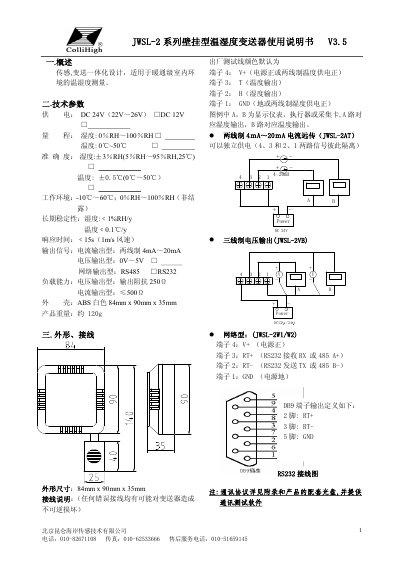
The Kunlun Hai'an JWSL-2 series is an integrated sensor and transmitter designed for HVAC-grade indoor environments. It measures temperature and humidity with high accuracy, offering various output options including 4-20mA current, 0-5V voltage, and RS485/RS232 network protocols. The device features a compact ABS housing suitable for wall mounting. This manual is written in Chinese.
| Power Supply | DC 24V (22V~26V) or DC 12V |
|---|---|
| Humidity Range | 0% RH ~ 100% RH |
| Humidity Accuracy | ±3% RH (5% RH~95% RH, 25℃) |
| Temperature Accuracy | ±0.5℃ (0℃~50℃) |
| Response Time | < 15s (1m/s wind speed) |
| Output Signal | 4mA~20mA, 0V~5V, RS485, RS232 |
| Dimensions | 84mm x 90mm x 35mm |
The default baud rate is 9600 bit/s.
Divide the hexadecimal value by 10. For example, 0x0311 (785) represents 78.5% RH.
Subtract the value from 0xFFFF. For example, 0xFF8C converts to -11.5℃.
The defaults are COM1, 9600 baud, 8 data bits, 1 stop bit, No parity, and No flow control.