
Quick guide to operating the Itron OpenWay® 3.HZ electronic electricity meter, including display, optical button controls, PIN entry, historical data, and…
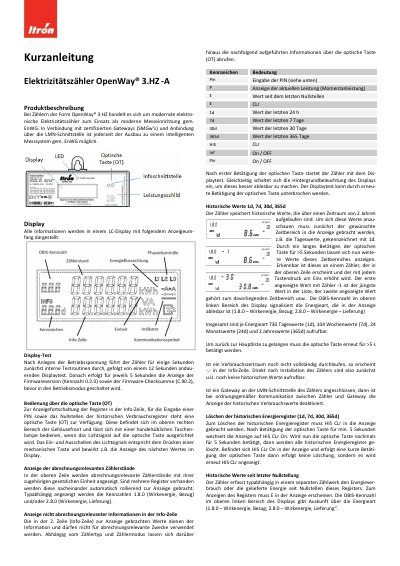
This document explains how to operate the Itron OpenWay® 3.HZ electronic electricity meter. It covers display functions, optical button controls, PIN entry, historical data viewing, and communication with gateways. The meter displays consumption data, historical usage, and operational status via an LCD screen. The optical button allows navigation and input without physical contact. Historical data can be viewed or cleared, and the meter supports communication via LMN interface and infrared interface for data output. This manual is written in German.
| Display Type | LC-Display |
|---|---|
| Historical Data Retention | 2 years |
| OBIS Codes | 1.8.0 (active energy, consumption) and/or 2.8.0 (active energy, supply) |
Press the optical button multiple times to display "Pin". Pressing the button for 5 seconds toggles between "Pin On" and "Pin Off" states.
Press the optical button to display "1d", "7d", "30d", or "365d". Hold the button for more than 5 seconds to scroll through values in that time range.
Display "HIS CLr" by pressing the optical button. Hold the button for 5 seconds to enter "HIS CLr On". Hold again for 5 seconds to clear all historical registers.
The display alternates between consumption information and "F.F" (Functional Failure) in the indicator area, and the device must be replaced.